Not sure which template? Answer two questions.
Download a free pay stub template (PDF, Excel, or Google Sheets)
Need a blank template right now? Grab one below — no account required.
Enter hours and pay rate — gross, Social Security (6.2% up to $184,500), Medicare (1.45%), and net pay calculate automatically. No watermark.
Download free Excel templateSame template, same formulas. Download the Excel file and open it in Google Sheets (File → Import) — everything works identically.
Get the Sheets templateA clean, printable blank of any of our 21 designs — free with a watermark. Best if you just need the layout and will enter figures by hand.
Choose a design below ↓A word of honesty before you download: a blank template does zero math. Federal and state withholding depend on your W-4, filing status, and state — get one number wrong and the stub won't survive a lender's or landlord's review. If you want the math guaranteed, use the generator instead — you'll see every calculated figure before paying anything.
Most popular templates
Chosen by thousands of customers every month.


Find your template
Every template includes accurate federal & state tax math — the difference is layout, detail level and paper size.
Pay stub templates for hourly employees
Show hours worked, overtime, and pay rate on separate lines. Classic styles keep it simple and print on check paper; most states that require pay statements require hours and rate for hourly workers, so don't skip those fields.
Pay stub templates for salaried employees
Salaried stubs show the per-period salary amount instead of hours × rate. The Modern family is the cleanest fit. Include YTD columns — it's the first thing a mortgage lender checks.
Pay stub templates for 1099 contractors & the self-employed
Contractors don't get taxes withheld, so a contractor stub shows gross payments with no FICA lines — and every template here has a contractor mode that swaps the fields automatically. Reminder for 2026: payers only have to issue a 1099-NEC above $2,000 in payments now, but your income is taxable (and provable) whether or not you receive a form — which is exactly why self-employed workers keep their own stubs.
Templates with benefits, PTO & extra deductions
If you need health insurance, 401(k), garnishments, or PTO balances itemized, use the Advanced family. Full-page layouts with room for every deduction line a real payroll run would show.
Compare template families
What every pay stub must include (and what fakes get wrong)
Federal law (the FLSA) doesn't actually require employers to hand out pay stubs — but it does require them to keep detailed pay records, and about 41 states require some form of written or electronic pay statement. Whatever the format, a stub that will pass a lender, landlord, or auditor's review includes all of the following:
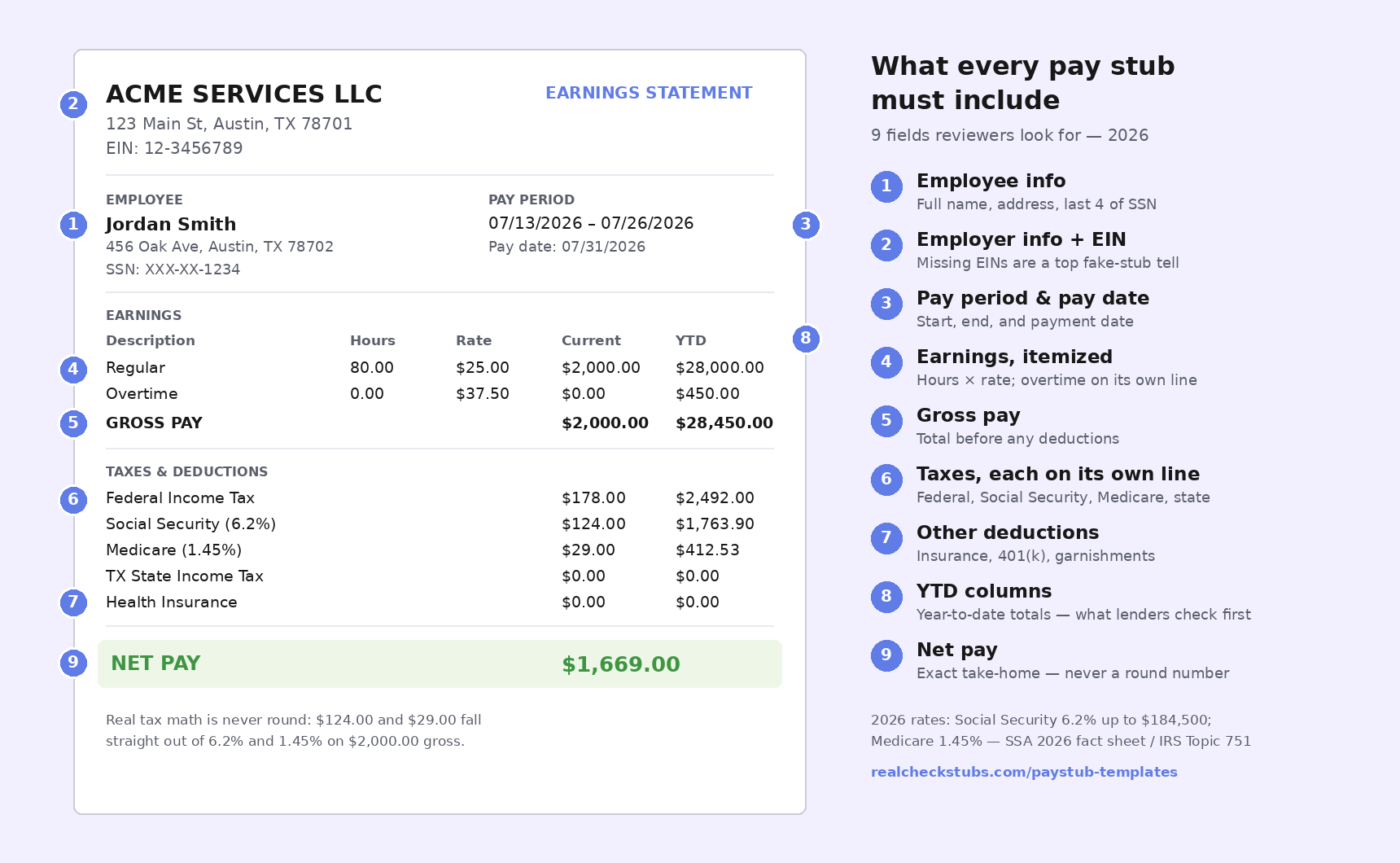
- Employee info — full name, and usually address and last 4 of SSN
- Employer info — legal business name, address, and EIN. Missing EINs are one of the most common tells on a homemade stub.
- Pay period — start date, end date, and pay date
- Earnings — hours and rate (hourly) or salary amount, with overtime/bonus/commission itemized separately
- Gross pay — total before anything comes out
- Taxes, itemized — federal income tax, Social Security, Medicare, and state/local tax each on its own line. A single lumped "taxes" line is another fake-stub tell.
- Other deductions — insurance, retirement, garnishments
- YTD columns — year-to-date figures for every earning and deduction line. This is the field weak stubs omit most, and the one reviewers rely on most.
- Net pay — the take-home amount
One more tell reviewers look for: perfectly round numbers. Real tax math almost never lands on $200.00 even. If the taxes on a stub are round, someone made them up.
How pay stub numbers are calculated in 2026
Here's the math a correct 2026 pay stub is built on — and what our generator runs automatically. Rates updated for 2026 — reviewed July 2026
Social Security (6.2%). Withheld on wages up to the 2026 taxable maximum of $184,500 (up from $176,100 in 2025). Above that, withholding stops.
Medicare (1.45% + 0.9%). 1.45% on all wages, no cap. An extra 0.9% Additional Medicare Tax kicks in on wages over $200,000.
Together these are FICA: 7.65% for employees. Self-employed workers pay both halves — 15.3% — via self-employment tax.
Federal income tax. Set by your W-4 and the IRS withholding tables (Publication 15-T) — it varies by filing status and adjustments, which is why no honest template can "build it in" as one flat formula.
State and local tax. Varies by state. Nine states withhold no state income tax on wages: Alaska, Florida, Nevada, New Hampshire, South Dakota, Tennessee, Texas, Washington, and Wyoming.
Rates verified against the SSA 2026 fact sheet and IRS Topic 751.
Notice the FICA lines aren't round numbers — $124.00 and $29.00 fall out of the percentages. That precision is what makes a stub credible. If doing this per pay period (and keeping YTD running totals straight) sounds tedious, that's the job the generator does in about two minutes.
Is it legal to make your own pay stubs?
Yes — if the numbers are real. Creating your own pay stub is legal and common: small employers issue their own stubs, and self-employed and gig workers generate stubs to document income they genuinely earned. The FLSA doesn't require a specific format, and a self-generated stub with accurate figures is a legitimate payroll record.
Where it becomes fraud: entering income you didn't earn, inflating wages, or "editing" a stub to qualify for a loan, apartment, or benefit. That's document fraud — it can carry civil liability and criminal charges, and lenders verify stubs against bank deposits and employer records more often than people think.
That line is why our generator works the way it does: you enter real figures, the math is computed correctly at current rates, and the result is a clean record of income that actually exists. If you're asked to "fix" a stub to show more income — don't. Regenerate a correct one from real numbers instead.
Reviewed by [REVIEWER NAME], [payroll/accounting credential] — last updated July 2026.
Pay stub template FAQ
What should a pay stub template include?
Employer name and address, employee details, pay period dates, gross pay, federal and state tax withholdings, FICA and Medicare deductions, year-to-date totals, and net pay. Every template here includes all required fields.
Is it legal to create my own check stubs?
Yes, as long as the income and tax figures are real. Employers, self-employed workers, and contractors legally create their own stubs every day. It becomes fraud only when the numbers are invented or inflated — see the legality section above for where that line sits.
Does Excel have a pay stub template?
Excel and Google Sheets don't ship with a built-in pay stub template, but you can download ours free on this page — it includes 2026 Social Security (6.2%, $184,500 wage base) and Medicare (1.45%) formulas. You'll still need to look up your own federal and state withholding; the generator handles those automatically if you'd rather not.
Is there a free pay stub template?
Yes — every template on this page has a free downloadable blank PDF, and the Excel/Google Sheets version with 2026 tax formulas is free with no watermark. Finished stubs from the generator are from $8.99 with everything included.
What's the difference between a template and a pay stub generator?
A template is a blank layout — you do the math. A generator calculates gross pay, FICA, federal and state withholding, and running YTD totals for you at current rates. Templates are fine for layout; the generator is the safer choice when the stub needs to be accurate (proof of income, record-keeping, lender review).
Can I print my pay stub?
Yes. Every template here is formatted for standard US letter paper (Classic styles also print on check paper). Download the PDF and print on plain white paper — no special stock is required. Stubs generated through the paid generator download without watermarks, print-ready.
How do I create a pay stub for a 1099 contractor?
Use any template in contractor mode: it shows gross payments without tax withholding lines, since contractors handle their own taxes. Note the stub documents payment — it doesn't replace the 1099-NEC the payer may need to issue (required above $2,000 in payments starting tax year 2026).
Why from $8.99 when others advertise $3.99?
Advertised base prices usually exclude the math: current W-4 withholding and additional earnings like overtime are paid add-ons elsewhere, bringing a complete stub to a similar total. Our price includes everything, and every calculation is visible in the editor before you pay anything.
What's the difference between an employee and a contractor pay stub?
Contractor stubs don't include tax withholdings, since payments to 1099 contractors generally aren't subject to them. Every template has a contractor mode that swaps the fields automatically.
How do landlords and lenders verify pay stubs?
They check that the math is internally consistent — gross minus deductions equals net, YTD figures accumulate correctly — and may verify employment directly. That's why accurate tax calculation matters: a stub with wrong math gets flagged.
How do I make my pay stub look real?
By making it be real: exact (non-rounded) tax amounts at 2026 rates, itemized tax lines, employer EIN, matching YTD totals, and consistent fonts. Those are exactly the things reviewers check — and exactly what the generator produces from real figures. There is no legitimate way to make invented income look real.