← All pay stub templates

Statement Pay Stub Template

For complete income records

Statement is one of the most complete layouts, a six-field reference row (CO, FILE, DEPT, CLOCK, VCHR. NO., NO.), a full year-to-date breakdown, and up to nine custom deduction lines split across two columns. It adds a Notes area, optional backgrounds and abbreviations, and an optional deposit slip for a comprehensive record.

Disclaimer: Watermarks will be removed after purchase

Use similar template, from $8.99

Download blank PDF (free, watermarked) · View filled sample PDF
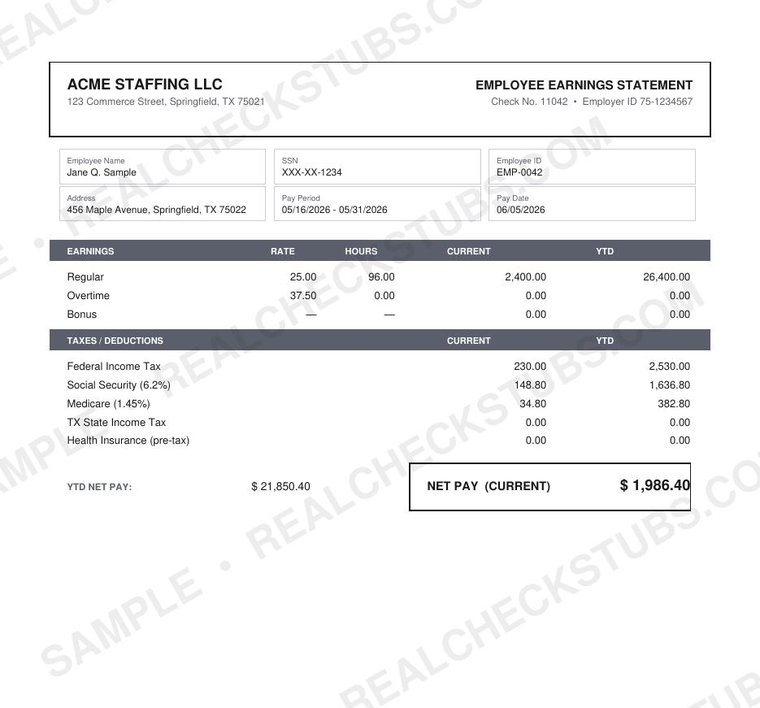
Statement (Advanced 5) pay stub template, watermarked sample with fictional data

What's on the Statement template

All fields below are filled and calculated automatically in the editor before you pay.

  • Six-field reference row: CO, FILE, DEPT, CLOCK, VCHR. NO., NO.
  • Regular plus four custom earning lines
  • Up to nine custom deduction lines (two columns)
  • Full YTD breakdown and a Notes area
  • Background and abbreviation options; optional deposit slip

Best for: the most complete, fully itemized record with extensive deduction detail.

How it works

  1. Enter your company, worker and pay details
  2. Preview the complete Statement stub, with every federal, state, FICA and Medicare calculation shown and watermarked
  3. Pay from $8.99 and download the watermark-free PDF instantly

Make Pay Stub

Statement template FAQ

How many deductions can Statement hold?

Up to nine custom deduction lines across two columns.

Is it the most detailed template?

It's among the most complete, with a full YTD breakdown.

Related Advanced templates

More layouts in the Advanced family.

Ledger Pro Advanced 7 Payroll Pro Advanced Corporate Advanced 2 Detail Grid Advanced 3 Full Account Advanced 4

← Browse all 21 pay stub templates