How to Access Walgreens Pay Stubs?

Quick Answer: Current Walgreens employees view pay stubs through WBA Worldwide / People Central at wbaworldwide.wba.com. Select your work location, sign in with your OneID (employee ID) and password, then open the payroll self-service area and choose your pay statement to view, download, or print any pay period. Pay stubs post biweekly (26 a year); employees widely report payday is every other Thursday, with direct deposit sometimes landing Wednesday, and timing can vary by location. Former employees can usually log in for a limited time after their last day. After that, contact Walgreens HR.
As a Walgreens employee, there will be plenty of moments when you need your payroll stub in hand. From lenders to landlords, there are many situations where someone asks you to prove your income. In those moments, it helps to know exactly how to pull your Walgreens employee pay stub from the company's online portal without scrambling.
In this guide, we walk through how to get your Walgreens paystub as a current employee and as a former one. We also clear up which portal is which, cover W-2s and the pay schedule, and show you what to do when a login will not cooperate.
Key Takeaways
- Where to log in: WBA Worldwide / People Central at wbaworldwide.wba.com, with sso.walgreens.com (a Walgreens OneID sign-on page) as an alternate single sign-on entry point.
- What to click: sign in with your OneID, then open the portal's payroll self-service area and select your pay statement to view, download, or print a stub.
- When you are paid: biweekly, 26 paychecks a year; employees report payday is every other Thursday (direct deposit sometimes lands Wednesday). Salaried management is typically paid monthly.
- Former employees: you keep portal access for a limited time after your last day, then you contact HR.
- W-2s: available in the same portal by January 31; missing yours? File IRS Form 4852 using your final pay stub.
Why Do Walgreens Employees Need Pay Stubs?
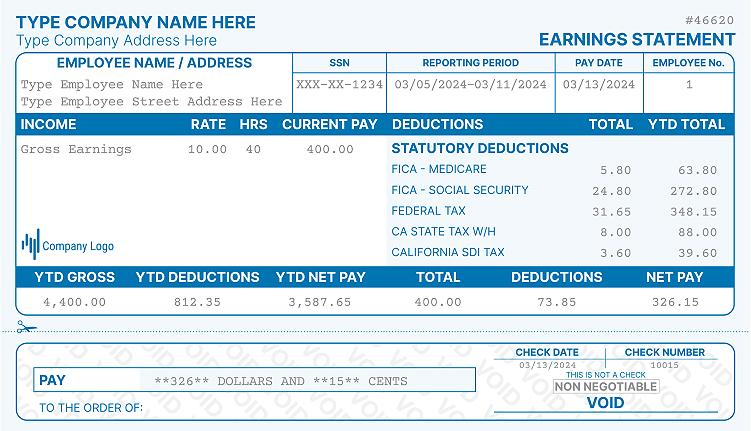
A pay stub is more than a breakdown of one paycheck. It shows your earnings, taxes, deductions, and net pay, so it gives you a clear picture of your financial health.
You might need check stubs when applying for a loan or renting a home. They also come in handy for sorting out a discrepancy in your salary or benefits.
Any time proof of income or a detailed payment history is required, these financial receipts do the job. Quick access to your Walgreens pay stubs keeps you from running into delays or misunderstandings when the request lands on short notice.
Walgreens Employee Portal Names, Explained
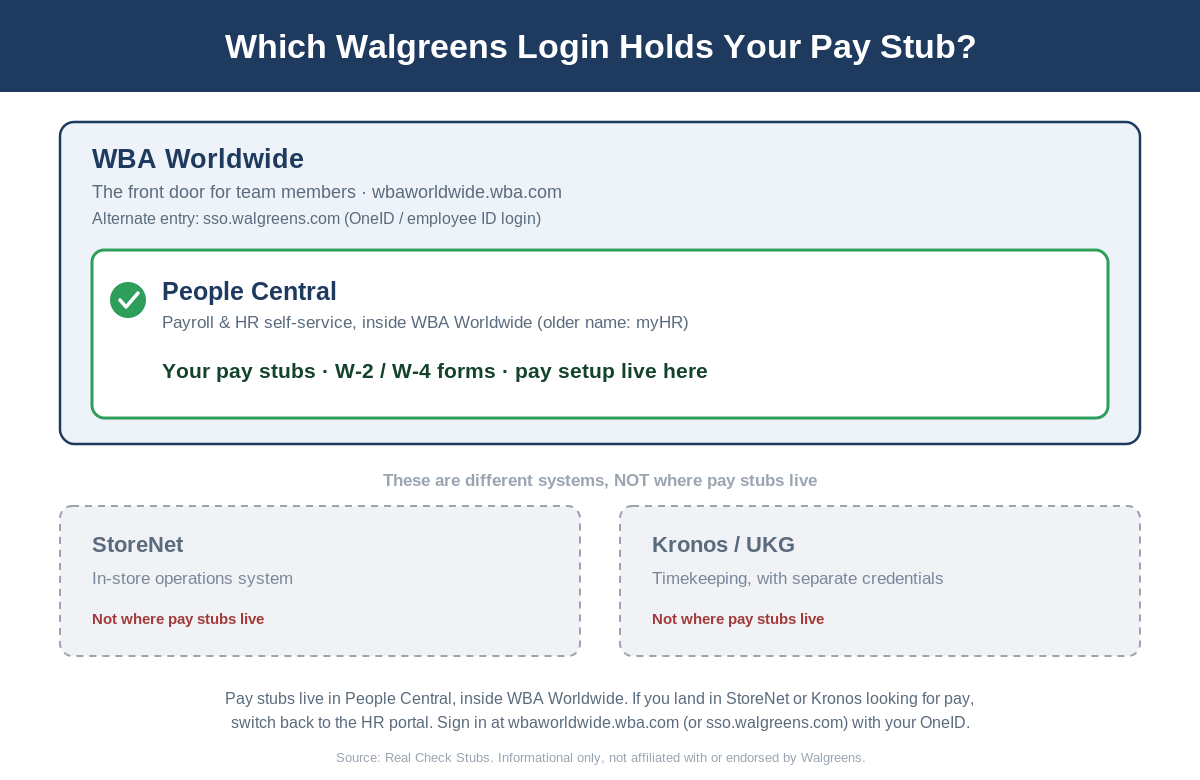
Search for "Walgreens pay stub" and you will run into a handful of portal names: WBA Worldwide, People Central, myHR, StoreNet, Kronos, UKG. It is easy to lose track of which one holds your pay. Here is how they fit together.
- WBA Worldwide (wbaworldwide.wba.com): the current umbrella employee portal for Walgreens Boots Alliance staff. This is the front door.
- People Central: the payroll and HR self-service section inside WBA Worldwide, where your pay stubs live.
- myHR: an older name for that same HR self-service system.
- Walgreens SSO (OneID) (sso.walgreens.com): a single sign-on entry point that uses your OneID.
- StoreNet: a separate in-store operations system, not where pay stubs live.
- Kronos / UKG: a separate timekeeping system that uses different credentials.
In plain terms: WBA Worldwide is the front door, People Central is the payroll and HR room inside it where your pay stubs and tax forms live, and myHR is just an older name for that same room. StoreNet and Kronos/UKG are different systems (store operations and timekeeping), so if you land there looking for pay, switch back to the HR portal.
How to View Your Walgreens Pay Stub Online (Current Employees)
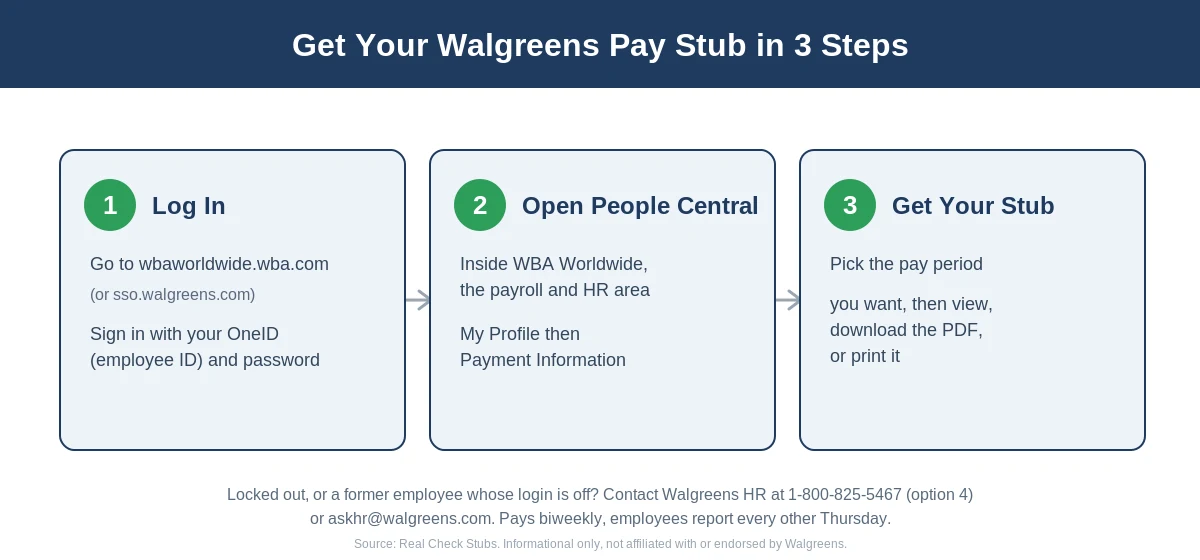
Walgreens runs a centralized platform for its team members, and your pay stubs sit inside People Central. There are two ways in, and both reach the same place, so if one will not load, use the other.
Step 1: Log In via WBA Worldwide
- Go to wbaworldwide.wba.com and select your work location.
- Sign in with your OneID (employee ID) and password.
- If you are on a new device, the site may ask for extra information to verify your identity, so keep your registered phone or email close.
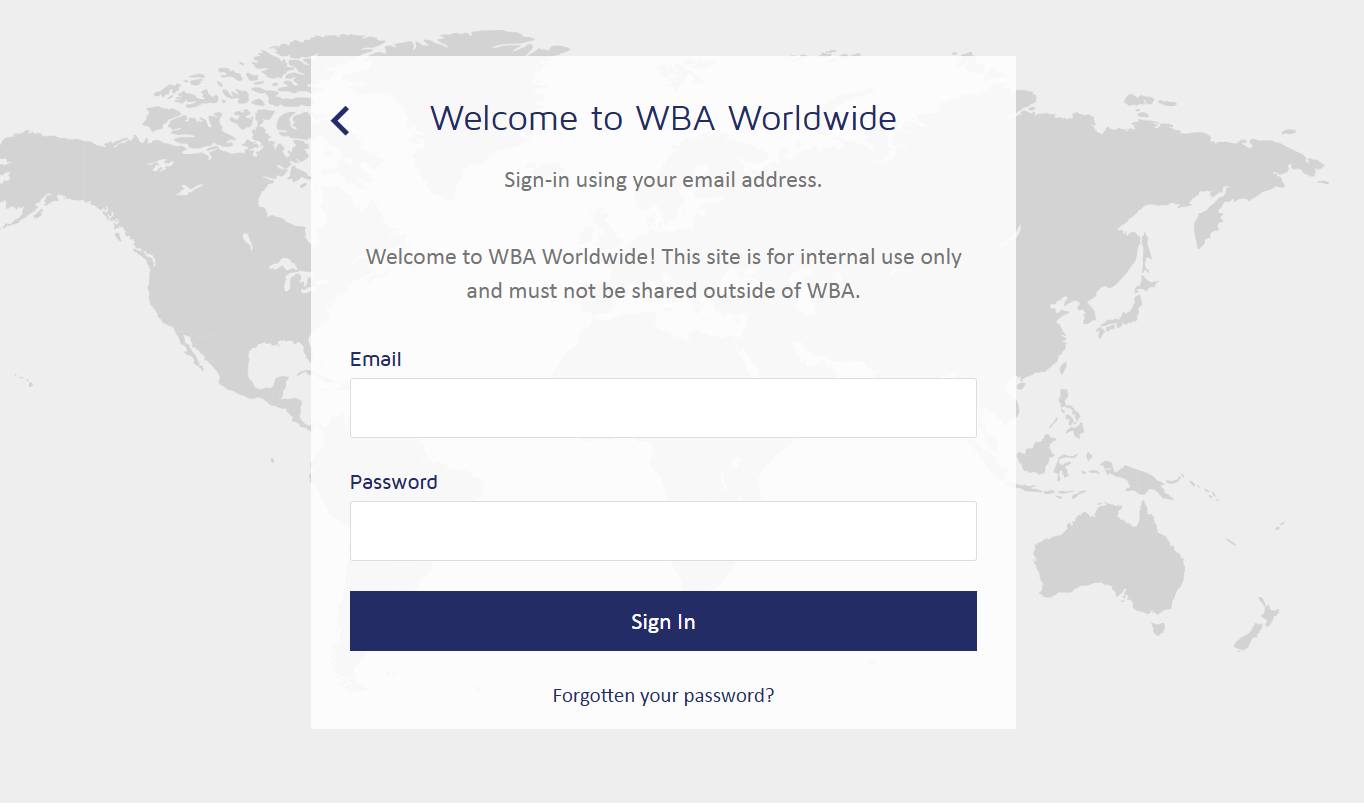
Step 2: Log In via Walgreens SSO (sso.walgreens.com)
If WBA Worldwide will not cooperate, the single sign-on page at sso.walgreens.com is a Walgreens OneID login. Enter your OneID and password there to reach your self-service tools.
Walgreens' official New Team Member Guide (updated 2026) shows that pay details live inside People Central under My Profile (for example, the Payment Information area), reached through the W Connect intranet. The exact label for viewing a pay statement can vary by portal version, so if you are unsure once you are signed in, ask your store manager or HR representative to point you to the current People Central team-member job aid.
Step 3: Download or Print Your Pay Stub
- Once you are in People Central, open your profile and pay area (under My Profile / Payment Information) and find your pay statements.
- Select the pay period you want.
- A window opens with your detailed pay stub for that period.
- From there, view, download the PDF, or print a copy for your records.
Tip: If wbaworldwide.wba.com will not load, try signing in at sso.walgreens.com with your OneID. Both are Walgreens sign-on pages.
How to Get Your Walgreens Pay Stub as a Former Employee
Leaving Walgreens does not mean losing your pay stubs, but timing matters, so grab what you need early.
While You Still Have Portal Access
For a limited time after your last day, you can usually still log in to wbaworldwide.wba.com with your existing OneID and download the pay stubs and tax forms you need. Walgreens does not publish an official length for this window, and the 45-day figure repeated on some sites is unconfirmed, so treat the window as short and download everything before your last day if you can.
After Access Is Disabled, Contact HR or Payroll
Once your login is deactivated, you request copies from Walgreens HR or payroll. Use one of the paths below, and avoid third-party "former employee portal" sites that claim to restore access.
- General HR line: 1-800-825-5467 (choose option 4 for HR)
- General HR and W-2 email: askhr@walgreens.com
- Former-employee W-2 site: w2.walgreens.com (if your credentials still work)
- In person: visit your former store to request copies.
The HR line and email above are listed on the Walgreens California Workforce Privacy Notice at walgreens.com, and w2.walgreens.com is a genuine Walgreen Co. site. Be cautious with phone numbers and "W-2 tax" email addresses that circulate on third-party blogs, since they are not published on any official Walgreens source.
What to Have Ready
Before you call or email, gather:
- Your full name
- Your employee ID
- Your Social Security number
- Your employment dates
- The exact pay periods you need
Expect a response within a few business days.
Walgreens W-2 and Tax Forms
Your W-2 lives in the same portal as your pay stubs, so once you know where the stubs are, the tax forms are close by.
Where to Find Your W-2 in the Portal
In People Central, open the payroll self-service area and look for the online W-2 option, where you can also review your W-4. Your pay stubs sit in the same payroll area.
When Walgreens Releases W-2s (by January 31)
Employers must make W-2s available by January 31, and Walgreens typically posts them in the last week of January. Check the portal first before assuming yours is missing.
Former-Employee W-2 Access
If you have left the company, you can email askhr@walgreens.com, call 1-800-825-5467 (option 4), or try w2.walgreens.com if your credentials still work. Have your identifying details ready, as listed above.
Missing W-2? Use Form 4852
If you have not received your W-2 by mid-February, contact Walgreens HR. After February 14 you can call the IRS at 800-829-1040, and if the form never arrives you can file with IRS Form 4852, a substitute W-2, using the year-to-date totals on your last pay stub.
Walgreens Pay Schedule
Walgreens pays hourly team members biweekly, which works out to 26 paychecks a year, with funds landing via direct deposit (the standard method). Salaried management is typically paid monthly. The pay period runs roughly Thursday to Wednesday, and employees widely report payday is every other Thursday, with direct deposit sometimes posting a day early on Wednesday.
You may see other sites claim Walgreens pays "every Friday" or "every Wednesday." Those do not line up with the firsthand employee reports above, which point to every other Thursday. Timing can still vary slightly by location, so confirm your exact payday with your store.
Walgreens People Central Login Troubleshooting
Having trouble getting in? These are the most common issues and how to fix them.
- Forgot your OneID or password: use the "Forgot User ID/Password" link on the login page to reset through your registered email or phone, or ask your store manager about a reset through the IT help desk.
- Multi-factor verification not working: if the code never arrives, make sure your registered phone number and email are current, since new-device sign-ins trigger an extra check. Contact Walgreens IT support if it persists.
- Portal will not load: People Central works best in Chrome, Edge, or Safari. Clear your browser cache, try an incognito window, or switch between wbaworldwide.wba.com and sso.walgreens.com (both are Walgreens sign-on pages).
- New employee, no access yet: new team members may need to wait until their first pay cycle before access is fully active. If you have not received your OneID, see your store manager or HR representative.
- Former employee, login deactivated: contact HR using the paths in the former-employee section above. Do not use third-party sites that claim to provide former-employee portal access.
Mobile Access
Can you check your pay stub on your phone? Yes. WBA Worldwide / People Central is browser-based and mobile-responsive, so it works on any phone without a separate download.
There is no confirmed dedicated Walgreens pay-stub app, so this guide does not name one. The easiest "app-like" setup is to open wbaworldwide.wba.com in your mobile browser and use "Add to Home Screen" for one-tap access.
Still Cannot Get It? When to Escalate
Most pay-stub requests are quick, but sometimes HR goes quiet or a final paycheck is at stake. If you are locked out and not getting a response:
- Follow up in writing so you have a record of your request and the dates you need.
- Keep asking specifically for the pay periods and documents you are owed, not a general "my records."
- If you still cannot get your final pay information, you can raise the issue with your state labor board, which handles pay and recordkeeping complaints.
Keep your request factual and documented, and give HR a reasonable window to respond before escalating.
Need a Copy for Your Records?
If you simply need a clean copy of a Walgreens pay stub for your own reference, a third-party pay stub generator can produce a replica in minutes. Enter the details, such as your name, company name, employee ID, work schedule, and pay-period dates, and download or print the result.
Important: Third-party replicas are for personal reference only and may not be accepted as official documentation by lenders or government agencies. For official records, always request directly from Walgreens HR.
FAQs on How to Get Walgreens Pay Stubs
How do I get my Walgreens pay stubs at home?
Log in to WBA Worldwide at wbaworldwide.wba.com (or sign in at sso.walgreens.com) with your OneID, open the payroll self-service area and select your pay statement, and view, download, or print any pay period.
How do I get my Walgreens pay stub after quitting?
For a limited time after your last day, you can still log in with your OneID and download stubs. After that, contact Walgreens HR at 1-800-825-5467 (option 4) or askhr@walgreens.com with your name, employee ID, Social Security number, and the pay periods you need.
What is the Walgreens employee portal called?
The umbrella portal is WBA Worldwide, and your pay stubs live in its People Central payroll and HR section (older name: myHR). StoreNet (store operations) and Kronos/UKG (timekeeping) are separate systems.
How often does Walgreens pay, and what day is payday?
Walgreens pays hourly staff biweekly, 26 paychecks a year (salaried management is usually monthly). Employees widely report payday is every other Thursday, with direct deposit sometimes landing Wednesday. Timing can vary slightly by location, so confirm yours with your store.
How long can I access the Walgreens portal after I leave?
You keep access for a limited time after you leave, after which your login is deactivated and you contact HR for copies. Walgreens does not publish an official length for that window, so download everything you need before your last day if you can.
What payroll provider does Walgreens use?
SAP SuccessFactors Employee Central Payroll, which Walgreens adopted in 2017 to replace its legacy payroll system.
When does Walgreens release W-2 forms, and how do I get mine?
By January 31, in People Central under the payroll self-service area's online W-2 option. Former employees can email askhr@walgreens.com, call 1-800-825-5467 (option 4), or try w2.walgreens.com. If it never arrives, file IRS Form 4852 using your last pay stub.
What if I cannot log in or the portal will not load?
Use "Forgot User ID/Password" to reset through your registered email or phone, make sure your MFA contact info is current for new-device checks, and try Chrome, Edge, or Safari with the cache cleared. You can also switch between wbaworldwide.wba.com and sso.walgreens.com (both are Walgreens sign-on pages). New hires may not have access until the first pay cycle, so see your store manager or HR.
Conclusion
If you have your Walgreens login credentials, the People Central portal is the fastest and most secure way to view a pay stub, whether you are a current or a recent former employee. When that route is not available, HR and payroll contacts fill the gap, and knowing which portal is which saves you from chasing the wrong login.
Keep your pay stubs and W-2s downloaded while you have access, and you will always have your income history ready when a lender, landlord, or tax deadline comes calling.
Need a clean copy for your own records? Try the Real Check Stubs pay stub generator to create a replica in minutes, and remember that third-party replicas are for personal reference, not official documentation.
More portal guides
Steps for other employers: CVS Health, Walmart, Dollar General. The full directory is in my pay stub portal guides hub, and if the portal is a dead end, the pay stub generator rebuilds your stub from your real pay details.

Kristen Larson is a payroll specialist with over 10 years of experience in the field. She received her Bachelor's degree in Business Administration from the University of Minnesota. Kristen has dedicated her career to helping organizations effectively manage their payroll processes with Real Check Stubs.
Our all Posts