How to Get a Check Stub From Randstad

You can get your Randstad pay stubs by logging in to the Workplace self-service portal at workplace.randstad.com, opening the "Self-Service" section, then viewing, downloading, or printing them. The Randstad app works too, and both show your W-2 forms next to your pay history.
Below is the full step-by-step, along with what to do if you have left Randstad or cannot log in. Keeping your own copies matters, since you will need them for loans, rentals, and taxes.
How to Get Pay Stubs From Randstad (Step-by-Step Guide)
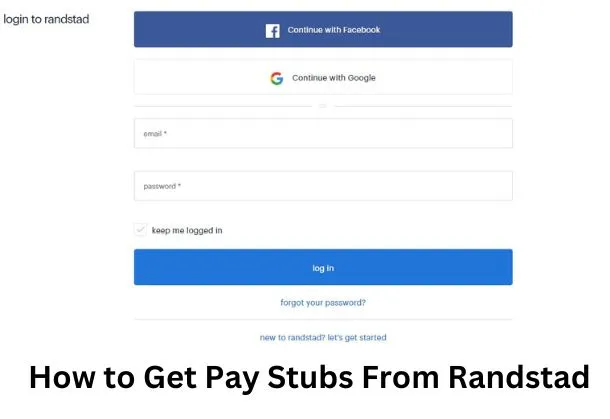
Getting your pay stub from Randstad takes just a few minutes through the Workplace portal. Here is how to view, download, and print it.
- Go to the Randstad Workplace portal and log in with your username (your email) and password. New users click "New User" to activate the account first.
- Once you are in, open your dashboard to see your available employee resources.
- Click "Self-Service," where you will find the link to your pay stubs and W-2 forms.
- Pick the pay period you need, then view, download, or print your pay stub right away.
Prefer your phone? The Randstad app has the same option. You can view your pay stubs and W-2 records directly in the app menu once you sign in.
Ways to Access Your Randstad Pay Stubs
| Method | Where to go | Best for |
|---|---|---|
| Workplace portal | workplace.randstad.com > Self-Service | Viewing, printing, and downloading stubs and W-2s |
| Randstad app | Menu > Pay Stubs | Quick mobile access on the go |
| HR or Payroll | 877-601-7453 | Missing periods or login problems |
What Information Do I Need to Get a Pay Stub From Randstad?
To access your payroll records, Randstad needs to verify your identity. First-time users complete a one-time activation, so have these details ready:
- The last four digits of your Social Security number
- Your employee ID and full name
- A valid email address (this also becomes your username)
- Answers to your security questions
- The pay period you need
After activation, you only need your username and password to log in. Keep your login private, and reset the password if you ever get locked out.
Why May You Need Pay Stubs From Randstad?
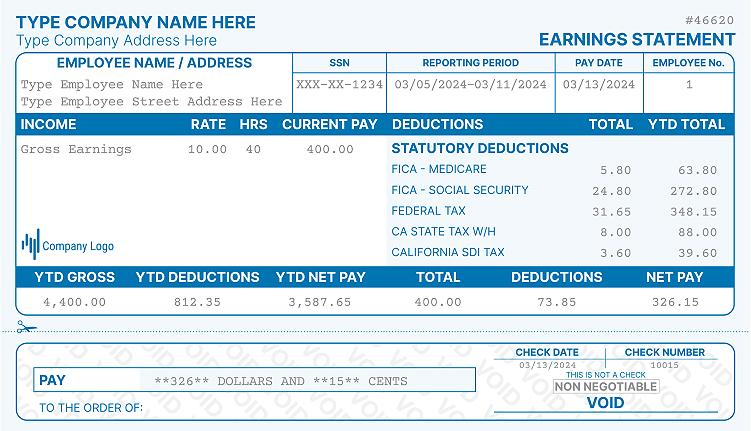
Pay stubs show your gross income, deductions, and net pay for each period. There are several reasons you may need to get a pay stub from Randstad:
- Income verification for loans, credit cards, or renting a home.
- Filing your taxes and matching totals against your W-2.
- Tracking your work hours and payment history.
- Catching and fixing errors on your paycheck.
Most Randstad assignments are paid weekly by direct deposit. Downloading a fresh pay stub each week keeps your records ready whenever proof of income is requested.
What to Do if You Don't Work at Randstad Anymore?
If you have left Randstad but still need your pay stubs or W-2, you have options to get pay stubs from a previous employer. Your Workplace login often stays active for a while after your assignment ends, so try signing in first.
If your access has closed, contact the Randstad Payroll or HR team to request copies. Have your full name, employee ID, and zip code ready so they can verify you quickly.
How Do I Get My Old Pay Stubs or W-2 Form From Randstad?
For past W-2 forms, use the automated phone system at 1-877-601-7453. Select 1 for W-2, enter your Social Security number and date of birth, then choose to have it emailed within 24 business hours or mailed within five to seven days. For older pay stubs that no longer appear online, ask Payroll to retrieve any archived periods.
Can I Make My Own Pay Stubs at Home?
Maybe you would rather not wait on your employer every time you need proof of income. If so, you can create your own pay stubs at home in minutes.
An online pay stub generator lets you enter your earnings, hours, and withholdings and get a clean, accurate stub instantly. Just make sure every figure matches your real pay, since a stub is only useful when it is correct. Need a year-end tax form too? You can also create a W-2 form with the same accuracy.
Do I Need Authorization if I Make My Own Pay Stubs Online?
You may need your employer's authorization to create your own pay stubs. Some states also require employers to provide accurate pay statements, so check your state's rules before making your own. The document must always reflect your true earnings and deductions.
FAQs
How do I look up my W-2 and pay stubs from Randstad?
Log in to workplace.randstad.com and open the "Self-Service" section from your dashboard. From there you can view and print both your current and past pay stubs and your W-2 records.
How do I get my Randstad W-2 as a former employee?
Call the automated line at 1-877-601-7453 and follow the prompts for a W-2 reprint. You can have it emailed within 24 business hours or mailed within five to seven days.
When does Randstad send out W-2 forms?
Randstad posts W-2 forms online by January 31 each year. To get yours electronically you must opt out of paper forms, otherwise it is mailed to the address on file.
What if I forgot my Randstad Workplace password?
Click the "Forgot password?" link under the password field and enter your email, which is also your username. A temporary reset link is emailed to you, so always use the most recent email since older links stop working.
How do I contact Randstad for pay stub or W-2 help?
Reach the Randstad Support Center at 877-601-7453 for payroll and tax form questions. You can also get in touch through the Randstad support page by chat, email, or phone.
References
- Randstad USA. "FAQ: How do I view my pay stubs and/or view my W-2 records?" https://www.randstadusa.com/about/faqs/
- Randstad USA. "Access Your W-2." https://www.randstadusa.com/access-your-2021-w-2/
- Randstad USA. "Randstad App: Find Jobs" (viewing pay stubs, W-2s, and weekly direct deposit). https://www.randstadusa.com/randstad-app/find-jobs/
- Randstad. "Workplace Self-Service Portal Login." https://www.workplace.randstad.com/
- Randstad USA. "Get in Touch / Support Center." https://www.randstadusa.com/get-in-touch/
More portal guides
Steps for other employers: Express Employment Professionals, Securitas, Help at Home. The full directory is in my pay stub portal guides hub, and if the portal is a dead end, the pay stub generator rebuilds your stub from your real pay details.

Kristen Larson is a payroll specialist with over 10 years of experience in the field. She received her Bachelor's degree in Business Administration from the University of Minnesota. Kristen has dedicated her career to helping organizations effectively manage their payroll processes with Real Check Stubs.
Our all Posts