Get Your HCA Healthcare Pay Stub

Getting your HCA Healthcare pay stub depends on which system your facility uses, and HCA is not a one-portal company.
Most current colleagues log in through HCAhrAnswers or the OneHR Portal, but employees at HealthTrust or Parallon-staffed facilities use a completely different site, and former employees have their own separate login.
This guide walks through every access route, current and former, so you can find your pay stub without guessing which portal applies to you.
Key Takeaways
- Current HCA colleagues access pay stubs through HCAhrAnswers (also called the OneHR Portal), using their 3-4 ID and network password.
- Employees at HealthTrust or Parallon-staffed facilities use a separate system: HCAGHR.com and the eStub wage statement site.
- Former employees can view pay history through the HCA Rewards Former Colleague Portal at hcarewards.lifeatworkportal.com, typically for around 18 months after separation.
- If you can't log in to any portal, HCA's Payroll and Benefits Support line is (844) 472-6797.
- Your pay stub login also gives you access to your W-2, filed under Annual Statements or Tax Documents in the same portal.
- HCA Healthcare employs approximately 320,000 colleagues across its hospitals and facilities, which is why it relies on multiple regional payroll systems instead of one central site.
Why HCA Pay Stub Access Isn't One Simple Login
HCA Healthcare operates hundreds of hospitals, surgery centers, and outpatient facilities across multiple divisions. Some of those facilities run payroll directly through HCA's own HR system. Others, particularly those staffed through HealthTrust Workforce Solutions or the Parallon shared services division, use a separate portal entirely.
That's why searches for an HCA paystub turn up more than one official login. If one portal doesn't recognize your credentials, it likely means your facility runs payroll through the other system, not that something is wrong with your account.
If you need a record of your income while you sort out portal access, our pay stub generator can help you put together an accurate stub for personal recordkeeping in the meantime.
Method 1: HCAhrAnswers / OneHR Portal (Current Employees)
This is the primary self-service system for most HCA-affiliated hospitals and facilities. It's sometimes called HCAhrAnswers and sometimes labeled the OneHR Portal, depending on your facility's branding, but they route to the same underlying HR system.
Steps:
- Go to the HCAhrAnswers login page from any browser (on or off the HCA network).
- Enter your 3-4 ID (your HCA employee identification number) and your current network password.
- From the main dashboard, click Pay, then select Pay History or Pay Check History.
- Choose the pay period you need and click View.
- Download or print the pay stub as a PDF.
What you'll need: your 3-4 ID, your network password, and access to the email or phone number on file if you need to verify your identity or reset a password.
New e-stubs are typically posted online the Thursday before payday, so if your pay stub isn't showing yet, check back a day before your scheduled deposit.
Method 2: HCAGHR.com and eStub (HealthTrust and Parallon Facilities)
If you work at a facility staffed through HealthTrust Workforce Solutions or processed through HCA's Parallon shared services division, your pay stub lives in a different system.
Steps:
- Go to HCAGHR.com and log in with your User ID and password.
- If you haven't opted in for direct deposit statements yet, do so under My Quick Links first.
- Click the My Paycheck tile near the top of the page.
- Select Wage Statements to view or download your pay stub, or Tax Documents for your W-2.
You can also reach the same wage statements directly through the eStub site at onlinewagestatements.com/parallon. If you're not sure which system covers your facility, your onboarding paperwork or a call to HR will confirm it.
Method 3: HCA Rewards Former Colleague Portal
Once you leave HCA, your HCAhrAnswers or HCAGHR access is generally deactivated. Former employees instead use the HCA Rewards portal, which keeps a separate login for alumni and beneficiaries.
Steps:
- Go to hcarewards.lifeatworkportal.com.
- If this is your first time on the former colleague side, select Register (first-time user) and follow the identity verification prompts.
- If you already registered, log in with your existing User Name and password.
- Navigate to your pay and benefits history to view past pay stubs and wage statements.
Former employees are generally able to use this portal for a limited window after separation, commonly cited as around 18 months, though this can vary by facility policy. After that window, HR assistance is your best route.
Method 4: eStub for Former HealthTrust and Parallon Employees
If your facility used the HealthTrust or Parallon payroll system while you were employed, your former-employee login works a little differently than the main HCA Rewards portal.
Steps:
- Go to onlinewagestatements.com/parallon2.
- Enter your 3-4 ID as your username.
- Select Forgot Password, then enter your Social Security number to reset your credentials and create a new password.
- Once logged in, you'll be able to view and download both pay stubs and W-2 tax documents.
This former-employee eStub access is one of the more reliable options because it isn't tied to your active network account, so it tends to keep working even after your other HCA logins are shut off.
Method 5: Call HCA Payroll and Benefits Support
If neither portal recognizes your login, or you've forgotten which system your facility used, HCA's centralized support line can point you in the right direction or issue a reprint.
Contact information:
- Phone: (844) 472-6797, HCA's dedicated line for payroll, W-2, and benefits questions for both current and former employees
- What to have ready: your full legal name, last four digits of your Social Security number, dates of employment, and the facility or hospital name where you worked
If you also need your HCA 401(k) information rather than a pay stub, that's handled separately through BConnected at (800) 566-4114, not the payroll line.
Method 6: Request a Reissued Copy Through HR
If you can't access either online system and the phone line can't resolve it, your facility's HR department can manually pull and reissue your pay stub or wage statement.
Provide your dates of employment and current mailing address, and ask specifically whether your facility processes payroll through HCAhrAnswers or through HealthTrust and Parallon. That detail alone often speeds up the request significantly.
Understanding What's on Your HCA Pay Stub
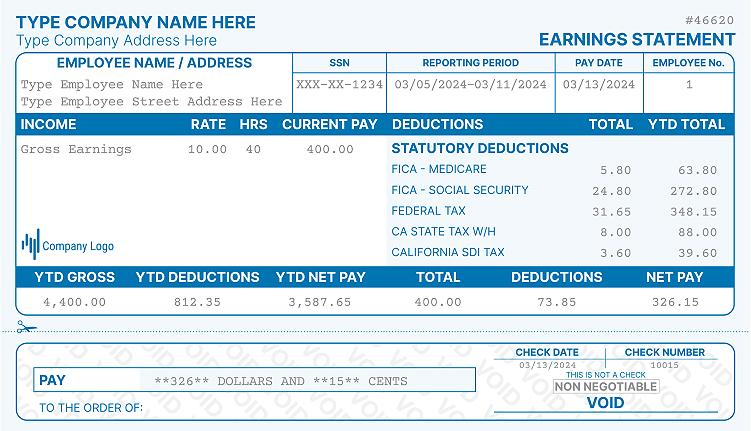
Once you're into your pay stub, here's what the main sections typically show.
| Section | What It Shows |
|---|---|
| Gross Pay | Total earnings for the pay period before any deductions |
| Federal and State Tax Withholding | Income tax withheld based on your W-4 elections |
| FICA (Social Security and Medicare) | 6.2% Social Security tax and 1.45% Medicare tax withheld from wages |
| Pre-Tax Deductions | 401(k) contributions, health insurance premiums, HSA or FSA contributions |
| PTO Balance | Accrued and used paid time off, tracked separately from pay |
| Net Pay | Take-home amount after all deductions and withholdings |
If a number looks off, such as a PTO balance that doesn't match what you expect or a deduction you don't recognize, contact your facility's HR or payroll office directly rather than assuming the portal is wrong.
What About Your W-2?
Your HCA pay stub login also gives you access to your annual W-2. Current employees find it under Pay → Annual Statements in HCAhrAnswers, while HealthTrust and Parallon employees find it under Tax Documents in HCAGHR.com or eStub.
Former employees typically still receive a mailed paper W-2 for the year their employment ended, regardless of which electronic delivery option they'd previously chosen.
If you run payroll for your own small business or need to issue a W-2 to an employee, our W-2 form maker can help you generate an accurate, professional form for legitimate payroll recordkeeping.
Special Situations
You Don't Know Which System Your Facility Uses
Try HCAhrAnswers first since it covers most HCA-branded hospitals. If your login isn't recognized, try HCAGHR.com next. Calling (844) 472-6797 will settle it either way.
Your Facility Changed Names or Was Sold
Hospital ownership changes occasionally shift which payroll system holds your historical records. HR at your former facility, or HCA's central payroll line, can locate records even after a name change.
You Need Income Verification for a Lender or Landlord
For formal employment or wage verification requests from a third party, HCA routes these through Thomas & Company using company code HCA747, separate from your personal pay stub login.
Deceased Former Employee
An authorized representative, such as an estate executor or surviving spouse, can request pay and wage records by contacting HCA HR with documentation of their authority.
Quick Reference: Where to Go
| Your Situation | Where to Go |
|---|---|
| Current employee, most HCA facilities | HCAhrAnswers / OneHR Portal |
| Current employee, HealthTrust or Parallon facility | HCAGHR.com |
| Former employee, within about 18 months | HCA Rewards Former Colleague Portal |
| Former HealthTrust or Parallon employee | onlinewagestatements.com/parallon2 |
| Can't log in anywhere | Call (844) 472-6797 |
| Need income verification for a lender | Thomas & Company, code HCA747 |
Frequently Asked Questions
How do former HCA employees get their W-2?
Log in to the HCA Rewards Former Colleague Portal or the eStub site at onlinewagestatements.com/parallon2, depending on your facility. If neither works, call HCA Payroll and Benefits Support at (844) 472-6797.
What payroll system does HCA use?
It depends on the facility. Most HCA-branded hospitals use HCAhrAnswers, while HealthTrust and Parallon-staffed locations use HCAGHR.com and the eStub wage statement system.
How do I find an old HCA 401(k) account?
Log in to HCArewards.com to view your retirement account details, or call BConnected at (800) 566-4114 if you can't access the portal. This is separate from your pay stub login.
How long can former employees access their HCA pay stubs online?
Access is typically available for around 18 months after separation, though this can vary by facility. After that window, contact HR directly for a reissued copy.
Can I get an HCA pay stub if I forgot my 3-4 ID?
Yes. Call (844) 472-6797 with your name, dates of employment, and facility name, and HCA payroll support can help you recover access or issue your pay stub directly.
References
- HCA Healthcare. (2026). Contact Us. https://www.hcahealthcare.com/contact-us
- HCA Healthcare. (2025). Impact Report. https://www.hcahealthcareimpact.com/
- HCA Rewards. (2026). Former Colleague Login. https://hcarewards.lifeatworkportal.com/
- HealthTrust Workforce Solutions. (2025). How to Access Your HealthTrust Tax Documents Online. https://engage.healthtrustjobs.com/how-to-access-tax-documents-online
- IRS. (2025). About Form W-2, Wage and Tax Statement. https://www.irs.gov/forms-pubs/about-form-w-2
More portal guides
Steps for other employers: IHSS, Coca-Cola Consolidated (CCBCC), PepsiCo. The full directory is in my pay stub portal guides hub, and if the portal is a dead end, the pay stub generator rebuilds your stub from your real pay details.

Kristen Larson is a payroll specialist with over 10 years of experience in the field. She received her Bachelor's degree in Business Administration from the University of Minnesota. Kristen has dedicated her career to helping organizations effectively manage their payroll processes with Real Check Stubs.
Our all Posts